Last updated
How To Protect Your Online Banking Account While Living Abroad
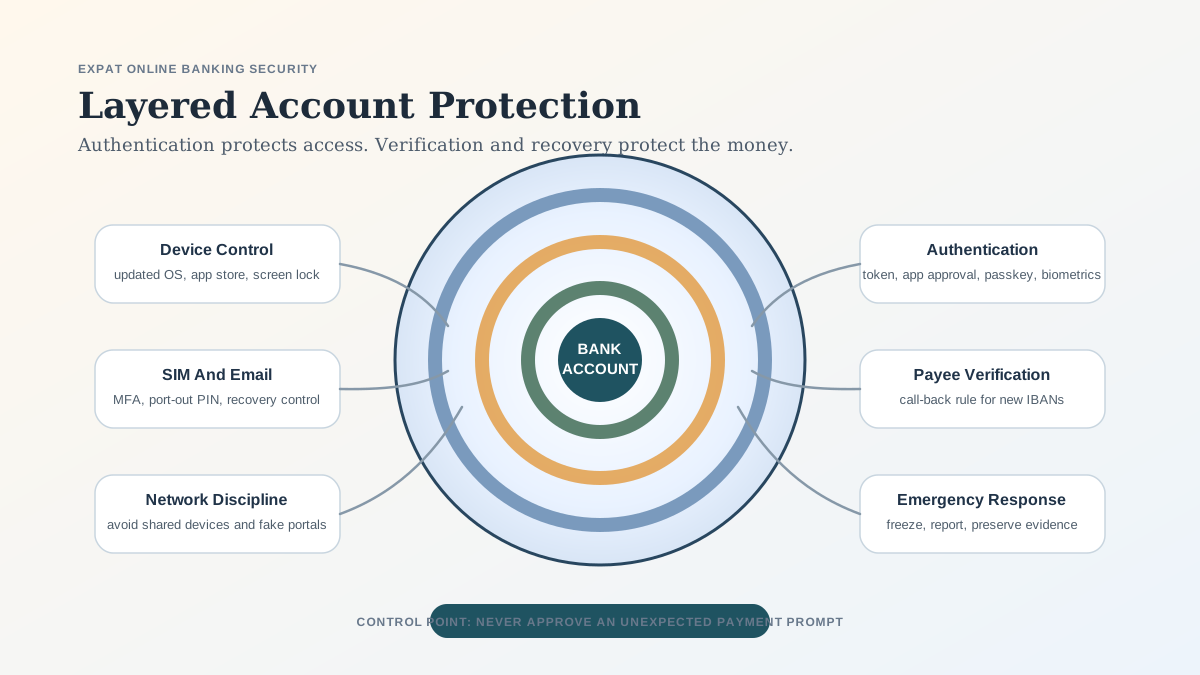
How To Protect Your Online Banking Account While Living Abroad is for new arrivals, expats, remote workers, and cross-border households who need to turn a broad search result into a concrete decision. It explains opening or using accounts, identity numbers, KYC evidence, cards, credit history, and payment access across Europe, then shows how to prepare identity, address, tax, income, source-of-funds, and card or credit evidence before an application is refused. The later sections connect quick answer, why living abroad changes the threat model, and build a three-layer defense so the next step is easier to judge. Read it before submitting forms, moving money, choosing a provider, or assuming that a rule from another country applies.
The risk is highest when normal activity starts to look unusual: foreign logins, new devices, new SIM cards, apartment deposits, tuition payments, relocation agents, international transfers, and urgent messages in another language. A bank may legitimately ask for updated identity or residence information, but scammers use the same themes to steal credentials or manipulate you into authorizing a payment.
Sources checked for this review: May 14, 2026. This guide is educational and does not replace bank-specific security instructions, legal advice, or fraud-case advice.
Quick Answer
Use your bank's strongest available authentication method, secure the email and phone number tied to the account, avoid approving unexpected push notifications, verify new payees through an independent channel, keep banking off shared devices, update your bank profile only inside official channels, and know how to freeze cards or contact the fraud team from abroad.
The most important principle is this: authentication protects login, but judgment protects payment authorization.
Why Living Abroad Changes The Threat Model
Living abroad introduces risks that may not exist at home.
| Abroad-specific factor | Security risk | Practical control |
|---|---|---|
| New phone number or SIM | SIM swap, lost SMS codes, recovery failure | Keep old number controlled or move to app/token authentication |
| Foreign IP address | Extra verification, account lock, phishing credibility | Use official app and prepare recovery contacts |
| Public Wi-Fi | Fake portals, weak device exposure, unsafe shared networks | Prefer mobile data or trusted networks |
| New landlords, schools, or agents | First-time transfer fraud | Verify payees outside the payment request |
| Language differences | Misreading warnings or support messages | Translate carefully and pause before approval |
| Time-zone gap | Delayed response to fraud alerts | Enable app, email, and card alerts |
| Residence updates | Confusion between real compliance requests and phishing | Update documents only through official channels |
| Cross-border payments | Harder recovery and more intermediaries | Preserve evidence and report quickly |
The EBA and ECB have warned that strong customer authentication remains effective against many fraud types, especially those it was designed to reduce, but fraudsters are adapting by manipulating users into authorizing transactions. See EBA: Joint EBA-ECB report on payment fraud.
Build A Three-Layer Defense
Use three layers rather than one.
| Layer | Goal | Practical controls |
|---|---|---|
| Account access | Stop account takeover | Strong password, MFA, trusted devices, secure email |
| Payment authorization | Stop manipulated transfers | Payee verification, call-back rules, transaction review |
| Recovery | Limit damage | Alerts, card freeze, bank hotline, evidence file |
A strong password without payee verification is not enough. A secure banking app without a recovery plan is not enough. A fraud hotline you cannot call from abroad is not enough.
Pre-Departure Banking Security Checklist
Before moving or traveling long term, complete this checklist from the official banking app or by typing the bank's domain directly into your browser.
- Confirm your mobile number, email, address, and tax-residence details are current.
- Enable the strongest authentication method the bank supports.
- Remove old phones, browsers, and devices from trusted-device lists.
- Turn on alerts for login, new device, new payee, outgoing transfer, card-not-present payment, and profile changes.
- Store the bank's international support and fraud-reporting numbers offline.
- Confirm whether cards can be frozen in the app.
- Check whether your bank restricts access after residence changes.
- Protect your primary email account with strong MFA.
- Add a PIN or port-out protection to your mobile provider account if available.
- Test that you can receive app notifications and bank messages abroad.
- Keep one backup payment method in a separate place.
EU consumer guidance notes that legally resident consumers in the EU have rights around basic payment accounts, while banks may still apply anti-money-laundering checks and request information. See Your Europe: Bank accounts in the EU. The security lesson is simple: keep bank records current, but never update them through message links.
Use Strong Authentication, But Do Not Treat It As A Magic Shield
Multi-factor authentication makes credential theft less useful, but it does not stop every scam. If a criminal convinces you to approve a transaction, the bank may see a valid authorization.
The UK National Cyber Security Centre explains that authentication methods can include SMS or email codes, physical tokens, biometrics, and app approval on a trusted device. See NCSC: Authentication methods.
Prefer methods in this order when your bank gives options:
| Authentication method | Relative strength | Main risk |
|---|---|---|
| Hardware security key or dedicated token | Very high | Loss or poor backup planning |
| Bank app with transaction details | High | Push-approval fatigue or device compromise |
| Biometric plus device binding | High | Recovery depends on device control |
| Authenticator app | Medium to high | Backup and device migration issues |
| SMS code | Medium | SIM swap, roaming, number loss |
| Email code | Medium | Email account takeover |
Rules for every authentication method:
- Never share a one-time code.
- Never approve a push notification you did not initiate.
- Read the amount, recipient, and transaction type before approval.
- Do not let anyone remote-control your phone or computer.
- Do not install "security software" because a caller or pop-up tells you to.
- Keep banking, email, telecom, and password-manager passwords unique.
Protect The Phone Number Behind Your Bank Account
SIM swap is a major risk for anyone relying on SMS codes while abroad. ENISA explains that SIM swapping occurs when an attacker convinces a telecom provider to move a victim's number to a SIM controlled by the attacker, which can enable online banking fraud and bypass two-factor authentication. See ENISA: Beware of SIM swapping fraud.
Reduce SIM risk:
| Control | Why it helps |
|---|---|
| Add telecom account PIN or port-out protection | Makes unauthorized SIM changes harder |
| Use bank app authentication instead of SMS when possible | Reduces dependence on phone-number control |
| Keep the home-country number active if it is tied to banking | Prevents accidental recovery loss |
| Protect mobile-provider login with MFA | Stops account takeover at telecom level |
| Avoid posting passport, address, travel, or phone-change details | Reduces social-engineering material |
| Treat sudden loss of signal as urgent | Could indicate SIM takeover |
| Keep provider account details available offline | Helps recovery from abroad |
If your phone loses service unexpectedly and you did not request a SIM change, contact your mobile provider and bank immediately from another trusted channel.
Make Phishing Harder To Succeed
Bank phishing abroad often uses plausible events: foreign login, blocked card, tax-residence update, missing visa document, landlord invoice, customs fee, or delivery problem. The safest action is to break contact and restart through an official channel.
The NCSC advises users not to use numbers or addresses in suspicious messages and to use details from the official website. See NCSC: Spot scam emails, texts, websites, and calls.
Do not click banking links from:
- SMS messages about account closure.
- Emails requesting residence verification.
- WhatsApp or Telegram messages from "bank support."
- Sponsored search results that imitate a bank login.
- QR codes on payment requests unless independently verified.
- Calls asking you to move money to a safe account.
- Emails announcing changed IBAN details.
Instead, open the bank app yourself, type the official domain, or call the number printed on your card or shown inside the app.
Use Public Wi-Fi With Realistic Caution
Public Wi-Fi is not automatically unsafe, but it is not a trusted banking environment. The FTC explains that encryption has improved public Wi-Fi safety but also warns that scam websites can be encrypted too, meaning a lock icon does not prove the site is legitimate. See FTC: Are public Wi-Fi networks safe?.
Practical rules:
| Situation | Safer choice |
|---|---|
| Hotel or airport Wi-Fi | Use mobile data for banking when possible |
| Shared computer | Do not bank on it |
| Public Wi-Fi captive portal | Do not install certificates or apps |
| Browser banking | Type the domain and check it carefully |
| Banking app | Prefer official app over search-result links |
| VPN use | Useful for network privacy, not a phishing cure |
| Device warnings | Stop if certificates or security settings look unusual |
A VPN does not make a fake bank page safe. HTTPS does not make a scammer trustworthy. The device and destination still matter.
Keep Devices Boring And Bank-Ready
Your phone may be your bank branch, identity wallet, card approval device, email inbox, and SIM manager. Treat it as financial infrastructure.
Minimum device controls:
- Use a strong screen lock.
- Keep the operating system current.
- Update banking apps only through official app stores.
- Do not root or jailbreak a banking device.
- Enable device encryption and remote wipe where available.
- Remove unused apps.
- Review app permissions for SMS, accessibility, notifications, screen recording, and device administration.
- Do not store banking passwords in notes, screenshots, or chats.
- Use a reputable password manager with a strong master password.
- Keep backups current enough to recover if the phone is lost.
If a device is lost abroad, act in this order: freeze cards if possible, contact the bank, contact the mobile provider, change email and banking passwords from a trusted device, remove trusted-device access, and file any required police or insurance report.
Verify New Payees Before Sending Money
The highest-risk event is often not login. It is the first payment to a new recipient.
High-risk payments abroad include:
| Payment type | Why it is risky |
|---|---|
| Apartment deposit | Urgency and large first payment |
| Tuition or school invoice | Cross-border bank details |
| Relocation agent | Hard to verify legitimacy |
| Immigration or visa service | Fear-based manipulation |
| Used car or furniture purchase | Common marketplace fraud |
| Family emergency request | Emotional pressure |
| Changed supplier invoice | Business email compromise |
| Crypto or investment transfer | Irreversible or high-risk destination |
Use independent verification. If a landlord emails a new IBAN, call a number from the lease, not the email. If an agent sends a payment link, verify the company's registration and contact details separately. For large first-time payments, consider a small test transfer and confirm receipt through a trusted channel.
EU instant-payment rules also add payee-verification requirements, which should help reduce misdirected payments. See European Commission: Instant euro payments and payee verification. Still, do not outsource judgment to the bank screen. Read the warning and pause if the name, IBAN, or context does not match.
Know Your EU Payment-Fraud Rights
If your account is in the EU or EEA, PSD2 contains important rules for unauthorized transactions. Directive 2015/2366 says the payment service user must notify the provider without undue delay after becoming aware of an unauthorized or incorrectly executed transaction and no later than 13 months after the debit date. It also provides refund and liability rules for unauthorized transactions, including a potential liability cap of EUR 50 in certain lost, stolen, or misappropriated payment-instrument cases, subject to exceptions such as fraud or gross negligence. See EUR-Lex: Directive 2015/2366.
Important limitation: an authorized scam transfer may be treated differently from an unauthorized account-takeover transaction. Report quickly, preserve evidence, and ask the bank to provide its decision and legal basis in writing if reimbursement is refused.
Emergency Response Plan
If you suspect fraud while abroad:
- Freeze cards and disable online payments if the app allows it.
- Contact the bank through the app, card number, or official website.
- Tell the bank whether your phone, SIM, email, password, or device may be compromised.
- Ask the bank to block suspicious sessions, devices, payees, cards, and pending transfers.
- Change bank, email, telecom, and password-manager passwords from a trusted device.
- Contact your mobile provider if your number may be compromised.
- Save screenshots, transaction IDs, URLs, IBANs, phone numbers, emails, chat logs, and support case numbers.
- Report to local police, the relevant cybercrime portal, or consumer authority if required.
- Monitor accounts daily until the bank confirms containment.
Do not pay recovery fees to anyone claiming they can retrieve stolen funds. Recovery scams target people who have already been victimized.
Practical Security Scorecard
| Control | Low maturity | Strong maturity |
|---|---|---|
| Passwords | Reused or memorable | Unique, password-manager generated |
| MFA | SMS only | App, token, passkey, or transaction signing |
| Weak recovery | Strong MFA and secure recovery options | |
| Phone number | No carrier protection | PIN or port-out protection |
| Alerts | Card alerts only | Login, payee, transfer, device, profile alerts |
| Payee checks | Trusts emails | Independent verification |
| Device | Old OS, many apps | Updated, locked, minimal permissions |
| Network | Banks anywhere | Uses trusted network or mobile data |
| Emergency plan | Searches during crisis | Offline bank and telecom contacts |
FAQ
Is online banking safe while living abroad?
Yes, if you control your device, email, phone number, authentication method, and payment decisions. The biggest risks are phishing, SIM swap, manipulated transfers, device loss, and delayed fraud response.
Should I use SMS codes for banking abroad?
SMS is better than no second factor, but it is weaker than app-based approval, hardware tokens, passkeys, or transaction-signing methods. SIM swap and roaming problems make SMS less reliable for long-term living abroad.
Is a VPN enough for safe online banking?
No. A VPN may protect some network traffic, but it does not stop phishing, fake bank websites, malicious apps, SIM swap, or manipulated transfers.
What should I do if my bank asks for updated residence documents?
Do not click the message link. Open the official banking app or type the bank's domain manually, then check secure messages or profile requests. If uncertain, call the bank using an official number.
What if I lose my phone abroad?
Freeze cards if possible, contact the bank, contact your mobile provider, change key passwords from a trusted device, remove the lost phone from trusted-device lists, and preserve evidence. If theft occurred, file a police report if required by the bank or insurer.
Will EU law refund all online banking fraud?
No. EU law has strong protections for unauthorized transactions, but authorized scam transfers can be more complex. Speed, evidence, and the exact facts matter.
Pre-departure banking security setup
Before moving abroad, audit every dependency around the bank account. Confirm the email address used for banking, the phone number used for authentication, the recovery email, trusted devices, password manager, mobile carrier, card controls, emergency contact numbers, and postal address. A secure bank password is not enough if the recovery email or SIM can be taken over.
Set up app-based approvals, hardware tokens, passkeys, or transaction signing where the bank supports them. Keep SMS as a fallback only if necessary, and protect the mobile number with carrier PINs or port-out protection. If the bank requires a domestic phone number, decide before departure whether roaming, eSIM, dual SIM, or a trusted domestic number is the safest option.
Download offline copies of emergency numbers, bank card numbers' last four digits, insurance contacts, telecom contacts, and instructions for freezing cards. Store them securely but accessibly. If the phone is stolen, the emergency plan should not depend on the stolen phone.
Device and identity hygiene
Use a dedicated, updated device for banking where practical. At minimum, keep the phone operating system current, remove unused apps, disable unnecessary permissions, use a strong screen lock, enable device-finding features, and encrypt backups. Do not install unknown keyboard apps, remote-access apps, APKs, browser extensions, or "security" tools from untrusted sources.
Protect the email account more strongly than the bank account. Email is often the reset path for banking, telecom, cloud storage, and password managers. Use unique passwords, phishing-resistant MFA where available, backup codes stored offline, and secure recovery settings. Remove old recovery emails and phone numbers that are no longer controlled.
If the bank uses trusted-device approvals, review the trusted-device list monthly. Remove old phones, tablets, browsers, and laptops. If a device is sold, lost, repaired, or shared, remove it from banking and email trust lists immediately.
Transfer and payee controls
Most serious losses abroad come from manipulated transfers, not card skimming. Use a cooling-off rule for new payees, property deposits, investment transfers, crypto purchases, emergency family requests, and large supplier payments. Verify payment instructions through a second channel that was not supplied in the suspicious message. For rent or property deposits, confirm IBAN, legal name, lease, and counterparty identity.
Set low default transfer limits and raise them temporarily only when needed. If the bank allows payee whitelists, payment delays, account nicknames, or transaction signing that shows amount and payee, enable them. Alerts should cover new payees, profile changes, device logins, password changes, card-not-present purchases, and outbound transfers.
Beware of authority impersonation. Police, tax offices, immigration officials, delivery companies, banks, and telecom providers are common lures. When abroad, the fear of missing a visa, tax, bank, or package notice makes people more likely to click. Type official domains manually and use secure in-app messages rather than links.
Public network and travel routines
Avoid banking on shared computers, hotel lobby machines, internet cafes, and borrowed phones. Use mobile data or a trusted private network. A VPN can reduce some network risks, but it cannot protect against fake bank pages, compromised devices, malicious browser extensions, or social engineering.
When crossing borders, keep the banking phone physically secure. Do not leave it unlocked in airport trays, cafes, coworking spaces, rideshares, or shared accommodation. If the phone contains banking apps, email, password manager, and eSIM, it is effectively a wallet, identity document, and keychain.
Travelers should separate cards and authentication. Keep one backup card and one backup authentication method away from the main wallet and phone. If everything is in one bag, one theft can disable money, phone, bank access, and recovery.
Monthly review while living abroad
Once a month, review bank alerts, card limits, trusted devices, payees, email recovery settings, telecom account security, and recent transactions. Confirm that residence documents, tax forms, or KYC requests from the bank are handled through official channels. Long-term expats often become vulnerable because old settings remain unchanged after moving.
Also review local scams in the country of residence. Fraud patterns differ by country: rental scams, parcel scams, fake tax messages, fake police calls, bank impersonation, utility-payment links, and marketplace scams can all become more convincing when they use local language and institutions.
Recovery evidence file
If fraud occurs, evidence quality affects the outcome. Preserve timestamps, screenshots, URLs, phone numbers, emails, SMS messages, bank case numbers, police reports, transaction IDs, device details, and telecom records. Write a timeline while events are fresh: when the message arrived, what was clicked, which device was used, when the bank was contacted, and what actions were taken.
Ask the bank to confirm whether it treats the transaction as unauthorized, authorized push-payment fraud, card fraud, or another category. The reimbursement path can differ. If reimbursement is refused, request the decision, reasons, and appeal or complaint route in writing.
Expat-specific risk map
Living abroad changes the threat model because more systems depend on remote access. A person may manage a bank account in one country, a phone number in another, a residence permit in a third, and income from multiple sources. Fraudsters exploit that complexity with fake bank KYC messages, delivery notices, tax letters, immigration warnings, rental deposits, investment offers, and emergency family requests.
The strongest defense is to define trusted channels. Banking requests should be verified in the app or typed website. Telecom changes should be verified through the carrier account. Tax and immigration messages should be checked through official portals, not links. Landlord and property payments should be verified against signed documents and independent contact details.
Expats should also reduce account sprawl. Close unused bank accounts, remove old cards from wallets, delete old payees, cancel unused subscriptions, and update addresses. Dormant accounts with old phone numbers and weak passwords can become entry points.
Residence-document and KYC requests
Banks often ask long-term expats to update tax residence, address, passport, visa, or source-of-funds information. Treat these requests seriously but cautiously. Do not upload documents through a link in an email unless the request is visible in the official app or secure message center. If unsure, call the bank using a number from the card or official website.
Keep clean scans of passport, residence permit, tax number, proof of address, and source-of-funds documents in encrypted storage. If a bank request is legitimate, responding quickly can prevent account restrictions. If the request is fraudulent, having a secure process prevents panic uploads to fake portals.
Tax-residence forms are especially sensitive. A fake CRS, FATCA, or KYC request can harvest passport numbers, tax IDs, addresses, and signatures. Verify the request through official channels before submitting.
Shared household and family controls
Families living abroad often share devices, Wi-Fi, cards, and emergency access. Define who can access which accounts, where backup codes are stored, and what happens if one person loses a phone. Do not share bank passwords through chat or email. If a spouse or partner needs access, use authorized user, joint account, power-of-attorney, or bank-approved access where appropriate.
Children and elderly relatives can become indirect risks. A compromised family email account may be used to impersonate emergencies or request transfers. Teach household members to verify urgent payment requests through voice or video on known numbers.
Investment, crypto, and recovery scams
Expats are often targeted with investment pitches promising offshore safety, tax efficiency, crypto recovery, currency trading, or local real-estate access. Treat unsolicited investment messages as high risk. Verify licenses, legal entity, regulator registration, fee structure, and withdrawal terms. Do not let a caller or chat agent guide you through installing remote-access software or moving money.
Recovery scams are common after fraud. Anyone asking for an upfront fee, seed phrase, remote access, or "tax" to release recovered funds is likely compounding the loss. Report through the bank, police, regulator, or official cybercrime channels instead.
Account segmentation
Use account segmentation to limit damage. Keep daily spending money separate from savings. Use a low-limit card for online merchants where practical. Keep emergency funds in an account not linked to everyday cards. Do not store all cash in an account accessible through one phone and one email.
For residents with multiple countries, maintain a written map of accounts, cards, currencies, authentication methods, and emergency contacts. If something happens, the person or trusted family member should know which accounts to freeze first.
After-action review
After any suspected fraud, run a full review. Check bank devices, email logins, forwarding rules, telecom changes, password-manager access, cloud sessions, card wallets, payees, and recent downloads. Change passwords from a clean device. If malware or remote access is suspected, do not simply change passwords on the compromised device.
The final step is prevention improvement. Add stronger MFA, lower transfer limits, remove unnecessary payees, improve backups, and update the emergency plan. A small incident should make the whole system stronger.
Source Risks And Factual Uncertainty
Fraud typologies change quickly, and banks differ in authentication, refund handling, and device controls. PSD2 rights are implemented through national rules and bank procedures, so outcomes can vary. Readers should follow their own bank's security instructions and local reporting process.
Official And Primary Sources
- EBA: Joint EBA-ECB report on payment fraud
- UK NCSC: Authentication methods
- UK NCSC: Spot scam emails, texts, websites, and calls
- ENISA: SIM swapping fraud
- FTC: Public Wi-Fi safety
- EUR-Lex: Directive 2015/2366
- Your Europe: Bank accounts in the EU
- European Commission: Instant euro payments